

The Billing Relationship
Book the tour anytime, pay us after the tour has been run.
So how does this work?
First, you book the tour through a Fareharbor affiliate portal, or send a booking request by email to info@northernepics.com. If by request, we’ll get the tour booked and send you a confirmation. You collect payment from your clients, but you don’t pay us until after the tour has been run. At the end of each month during the summer, we’ll send you an invoice for 80% of any tours that were run during that month. This option is popular for large travel agencies with good invoicing and budgeting systems.
This option has some advantages for you, as you can get the money from your clients now and don’t have to pay us until later. However, that also means that we need to do more of a vetting process than if you were to use the Net Rate or Referral relationship. Because of this, it will take longer to set up this relationship than it will the others. We’ll still be fast and efficient, but it probably won’t be under 18 hours like it will with the Net Rate setup.
Billing Relationship Application Form
Frequently Asked Questions
-
There are two options. If you’re connected with us through a Fareharbor affiliate portal, you can book directly into our calendar for any open availability. If you’d rather send booking requests over email, send an email with the tour name, number of guests, the pick up location, and the client name and phone number.
-
You take payment from your client however you prefer to do so. Then we’ll invoice you for 80% of the tour cost at the end of the month that the tour was run.
-
Just send us an email or give us a call letting us know and we’ll get them canceled right away.
Our cancellation policy is a full refund on any cancellations made before the the guide arrives to pick up the client.
With that said, we honor your cancellation policy and will encourage the client to work with you rather than us for cancellations. If you ever want us to approve a refund for a client, we will do so ten times out of ten.
-
This is too big of a question to answer here, so I’ll explain more below the FAQ section.
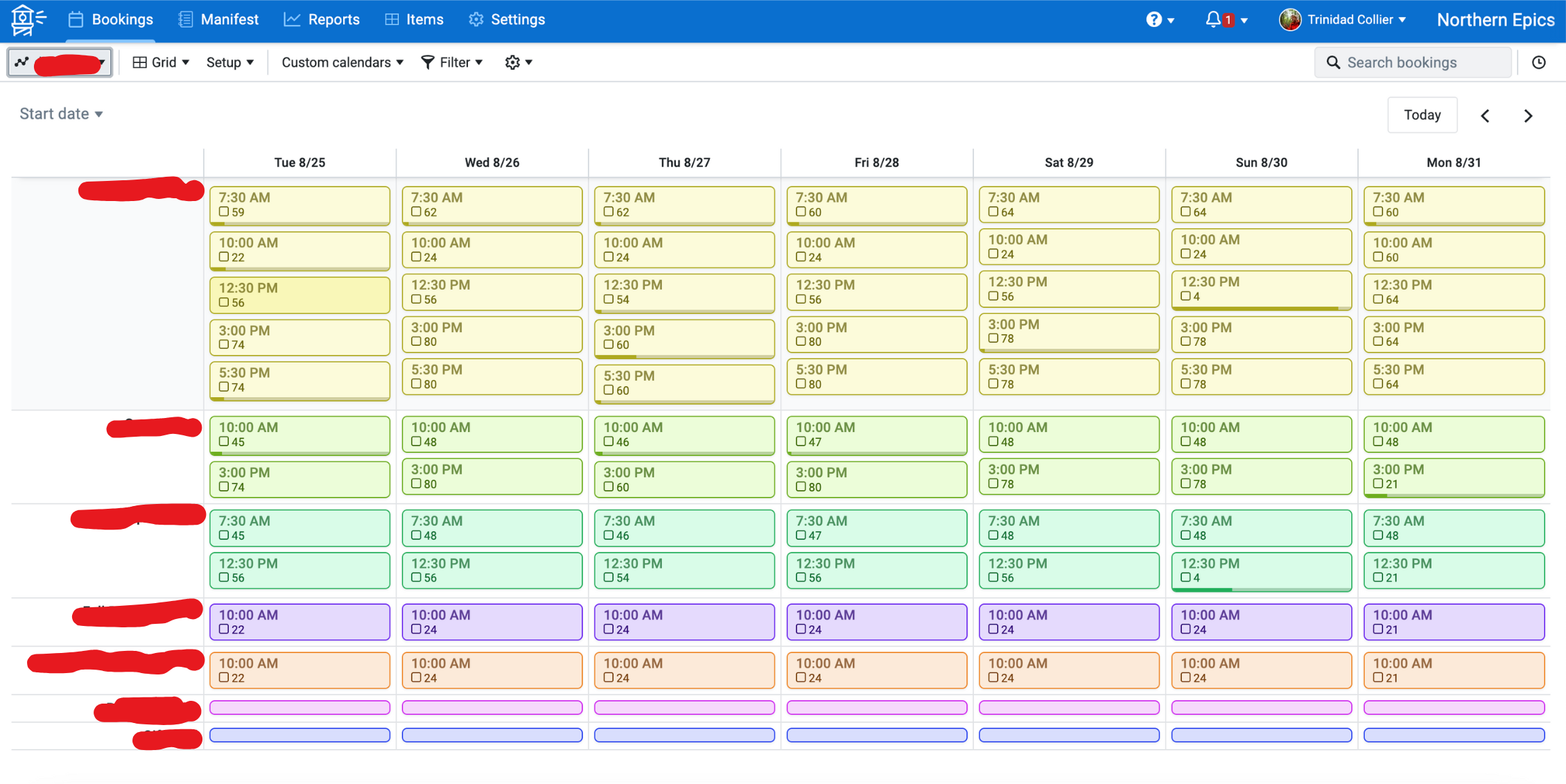
This is the portal of one of our partners who we’re an affiliate for. All of the key information has been removed, but it looks like what you’ll see on ours. The redacted info on the top left is the company dashboard. If you work with multiple affiliates, you can flip between their calendars here.
Below that, with the “start date” feature, you can select the date you want to view. The redacted info on the left side of the calendar are the different tour names. Each rectangle on the calendar is an availability, and the available capacity is displayed next to the square below the availability time.
What does the Fareharbor affiliate portal look like?
How do I get one?
Just fill out the form above and and check the box indicating you’d like to be set up with a portal. We’ll tell the Fareharbor team so and they’ll be in touch shortly to help you get set up!
Once you’re set up, you’ll be able to book directly into our calendar anytime. This is the easiest set up for most people unless you already have a system in place. If you do, we’ll be happy to go with that!